MacOS Woes (part #94)
 I'm two months into my 'exciting' adventure with macOS! For the most part, it's been fine, even if the windows handling is primitive and its privacy/security settings can seem a bit over-eager at times. Today, however, I got really cheesed off! The problem is a big one for fans of classical music who are forever having to tag things with ß, ä or è characters. Like me who, yesterday, finally got around to cataloguing a performance of Ernest Chausson's Poème.
The first issue is how you type foreign characters on an iMac at all: it has its own native way of doing it (for example, holding down the 'e' key will, in most situations, produce a pop-up from which you can select the appropriately-accented version), but that doesn't work in Semplice because all you get by holding down the 'e' key there is 'eeeeeeeeeee'! Anyway, I sorted this out way back in January in a way documented (roughly) here: see the section headed "Compose Key". I can now type “poème” as I would have done on any Linux machine: tap right-command, press `, press e: job done!
This morning, however, I played the piece I catalogued yesterday and saw this in Giocoso:
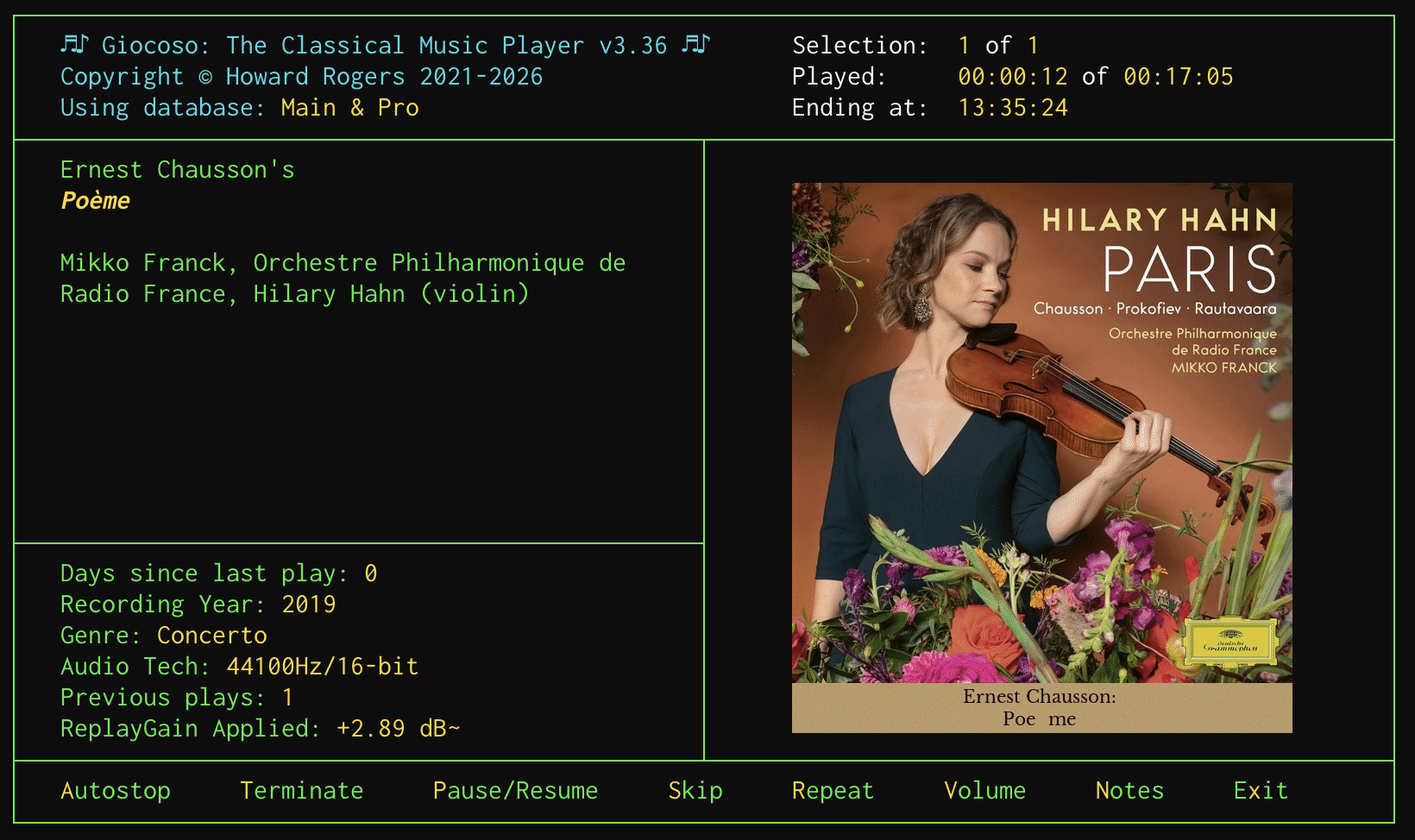
In case it's not obvious, let me zoom in on the artwork display there:

Rather than “Poème”, we have Giocoso rendering things as “Poe me”: no accent, but an extra space. But look over on the left-hand side of the Giocoso display: there the work is rendered as “Poème” entirely correctly! And here's the thing: both the artwork and the left-hand side text are both being read from the same metadata tag (in this case, the ALBUM tag). So what's going on?!
The issue basically boils down to the fact that (unbeknownst to me!) there are actually two Unicode renditions of any given character. We might call them “composed Unicode” and “decomposed Unicode”, because the point is that è can be represented as a single, merged glyph or character, or as a combination of the separate “e” and “`” characters. Linux uses the “composed” version of accented characters… and, guess what?!, macOS uses the “decomposed” version. The net result is that, if you tag your music on macOS, you think you're typing a single, composed è, but macOS steps in and stores it as the decomposed “e+`” equivalent. Text applications tend to render either version identically (which is why the left-hand side of Giocoso gets it right), but ImageMagick, the graphical program that's used to generate the artwork and captions for the right-hand side of Giocoso's display, does not.
What's particularly annoying about this is that my Karabiner Elements keybindings explicitly produce composed Unicode in the NFC form… yet macOS takes it upon itself to decompose the resulting character and store it in the decomposed, NFD form. It deliberately changes what you've typed in! And in a way you'd never know, because things like file systems display the results identically.
Anyway, after some tweaking of the Semplice code and a bit of re-tagging, this was the result by this afternoon:
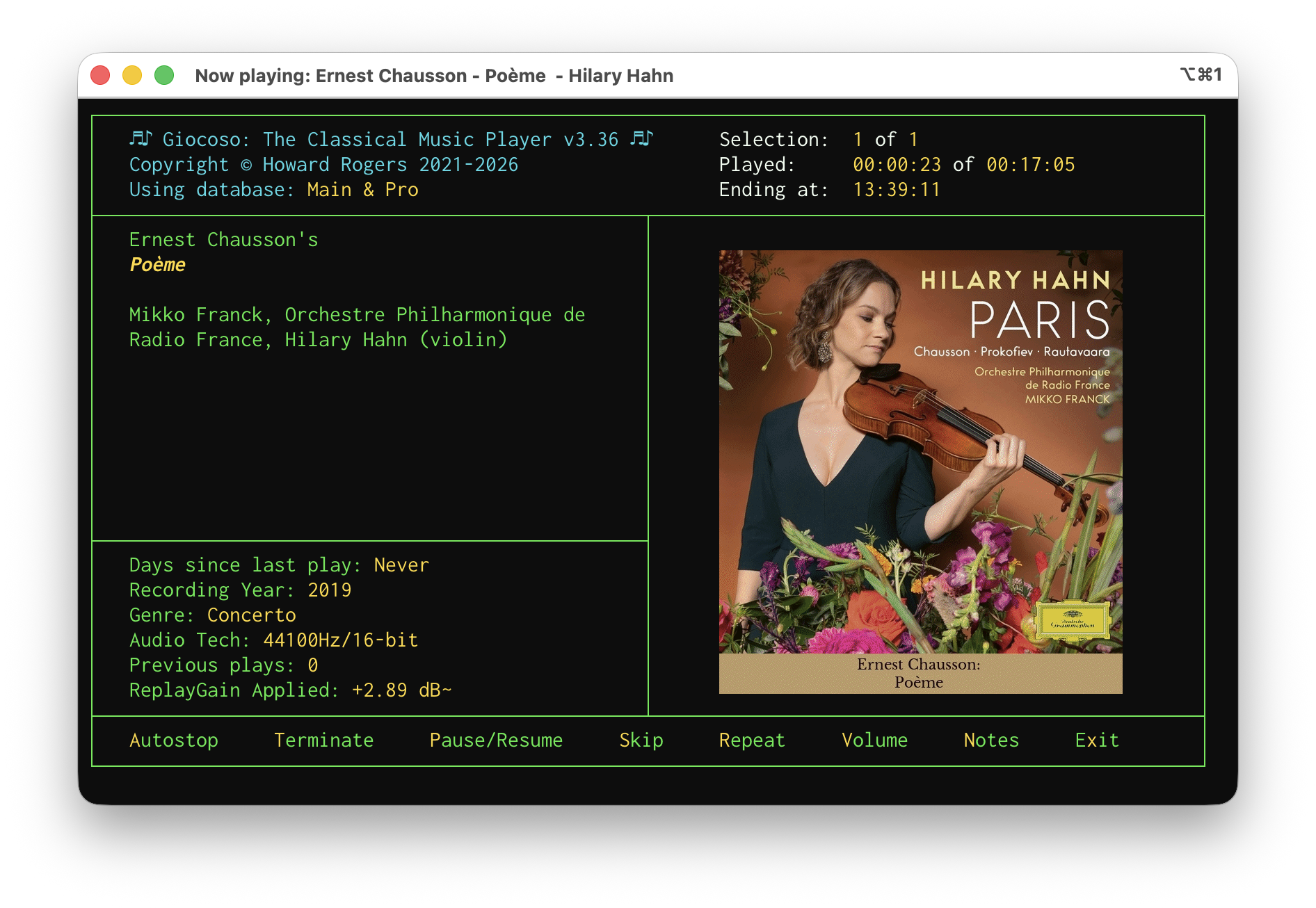
And zooming in again for clarity:

The cost of this fix? It's to make the uconv utility a dependency of Semplice on macOS (it's installed as a consequence of installing icu4c, which is done with a brew install icu4c). Semplice detects if you're running on macOS and, if so, takes your input for composer, composition, performer name as well as all other textual tags and passes them through the uconv utility to explicitly (and, this time, successfully) turn them into the composed, NFC version of Unicode that Linux recognises and prefers. If that utility is not present on your macOS then the conversion to composed Unicode doesn't happen and you may end up having to deal with captioned album art with weird spaces in it in future!
A new version of Semplice is imminent, but its release may have to be pushed back a little to ensure this latest cludge is working correctly! Watch this space, anyway. The new version will, of course, only affect fresh Semplice installations: if you're already using Semplice on macOS you'll need to install icu4c manually and, in addition, you'll need to make sure it gets into your PATH so that Semplice can find it when it needs to. Using Homebrew, the commands are:
brew install icu4c
sudo ln -s /opt/homebrew/opt/icu4c@78/bin/uconv /opt/homebrew/bin/uconv
If you're using Macports, the equivalent command is:
sudo port install icu
The “4c” part of the name is omitted and there's no need to link anything when using Macports, as the install ends up going into your existing PATH anyway.
It's annoying that there is such a low-level discrepancy in the way macOS and Linux handles such a fundamental issue. I wasn't aware of it earlier, simply because I hadn't done a lot of tagging work on macOS that involved characters with accents and the like… but the minute I started, the problems erupted, too! Hopefully fixed, anyway.
Giocoso Version 3.36 Released
 I have just released a new version of Giocoso: version 3.36. Full details are, as ever, in the relevant Changelog. Key takeaways, however, are:
- Better handling of PulseAudio from within the program, rather than relying on environment variables
- The introduction of minig: a way of launching a minimal Giocoso interface that can initiate playback or control existing playback from the sort of small, portrait-oriented terminal you'd likely get on a mobile phone (basically replacing mgiocoso, though that still exists for now, too)
- The usual array of bug fixes, including one that means Giocoso is not flummoxed by decimal separators that are not the usual '.'
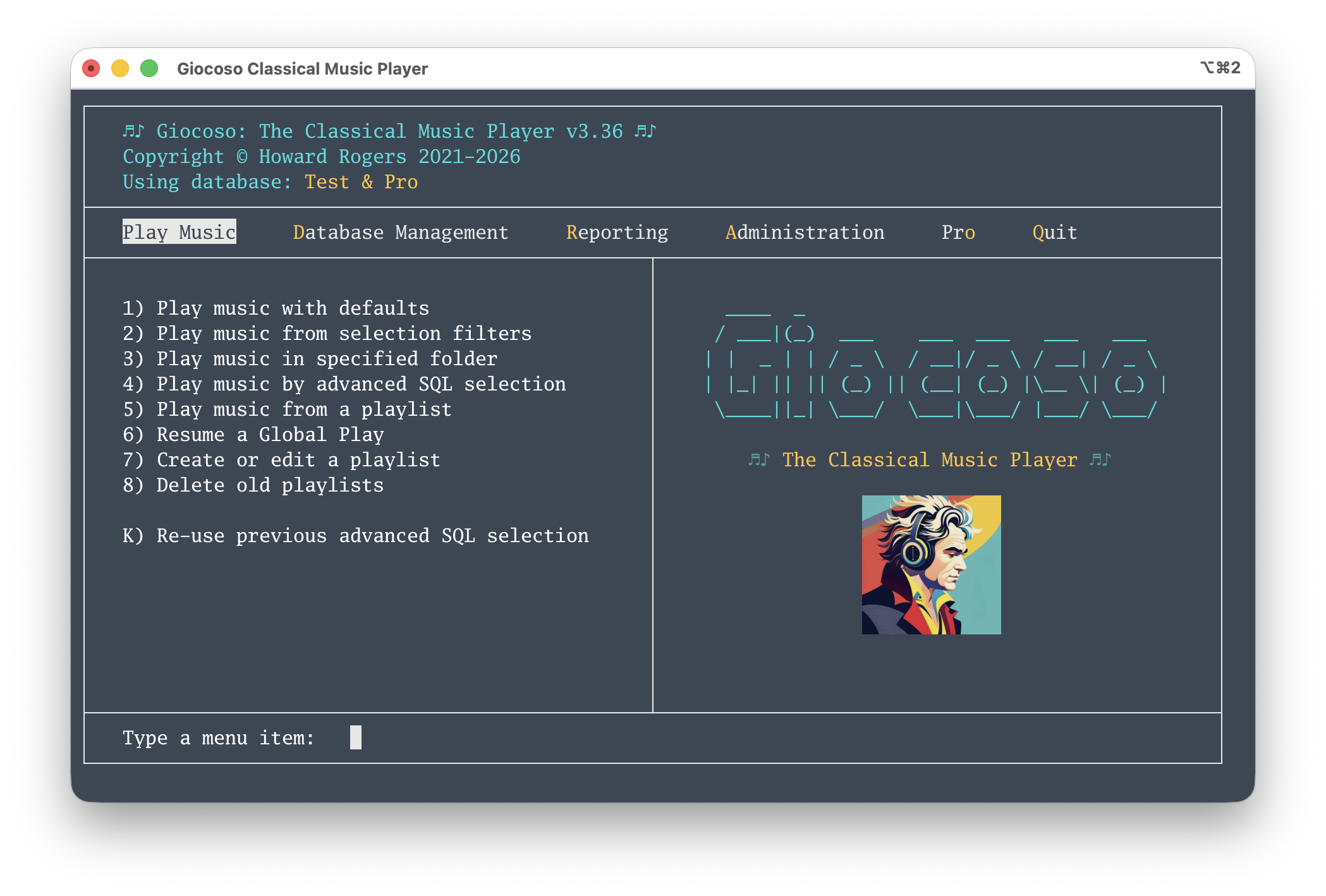
- A new program logo that now works better with non-black terminal colour schemes:
Updating is accomplished in the usual way: take the Administration menu, Option 1, supply the sudo password when prompted and sit back and let it happen. Quit Giocoso when the update completes, ignoring any error messages that might appear on the way out. Re-launch the program and enjoy!
The Problem of Portability (Part 2)
I wrote last time about a new feature in the about-to-be-released Version 3.36 of Giocoso: the ability to ssh into a machine that has Giocoso installed and then to initiate play of music (and subsequently to control it). This, essentially, gives us the following situation:
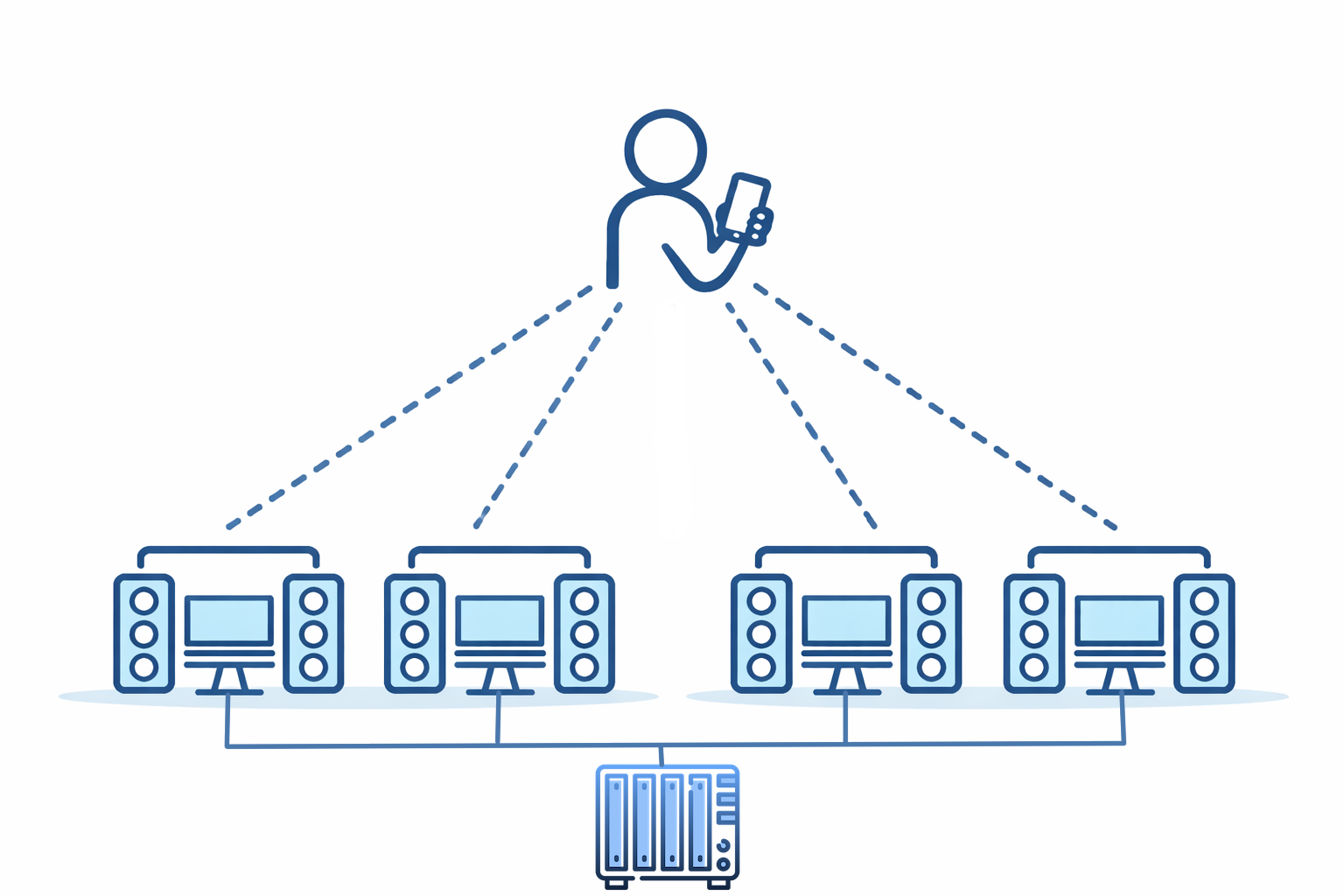
A person with a mobile device can ssh into multiple PCs, each running Giocoso and each with output available to speakers. Each of these 'playing PCs' is network-connected with NFS to the NAS box that contains my music collection: in this way, music can play in multiple rooms in the house. This is a first step to achieving “music portability” around the home: the ability to initiate music playback from an ssh connection is important to making this happen.
The drawback to this approach is one I’ve already hinted at: I have to ssh into each playing PC separately and each playing PC has to have enough compute resource to run Giocoso; each also has to have its own NFS connection to the music collection. Neither are particular intractable issues, but editing /etc/fstab to create a mounted NFS on multiple devices is a bit of a pain; and (especially of late) computers with screens, mouse, keyboard, RAM and decent CPU are not available at quite the bargain-basement prices they once were!
However, there is also the possibility of this sort of configuration:
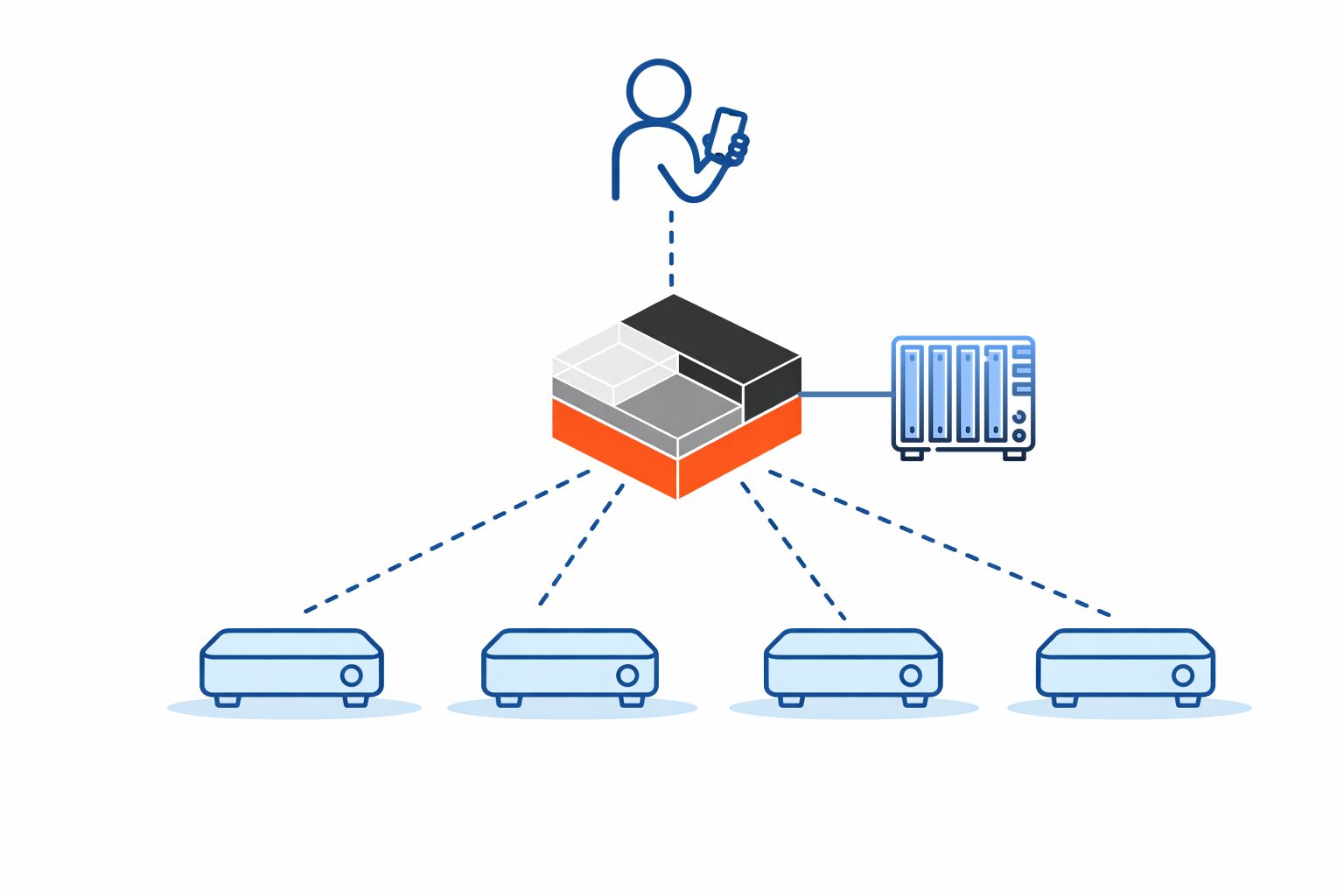
In this model, we have someone using a phone to control a single PC or computing device (and I’ll come back to the distinction between those two things in a moment!). It's the only computer connected to the NAS; it's the only one with sufficient compute resources to be able to run Giocoso. It is, in fact, the only PC running Giocoso! Somehow, however, this one 'playing PC' is pushing its audio output to four remote PCs over the network: these devices are mere ‘receivers’ of music, not players of it themselves. A subtle point being made in this diagram, too, is that the four ‘receiving’ devices are pretty minimal: they don’t have a screen, keyboard or mouse. They don’t need a powerful CPU (because they’re passive receivers of a music signal, not generators of it) and they don’t need much RAM (ditto). They do need speakers attached to them, obviously: they’re no use to anyone if they can’t make the audio signal they receive actually sound out in the air! My drawing skills didn’t extend to actually showing those necessary speakers, but they’re there nonetheless 
But this prompts the question: how can this configuration possibly work? How can a ‘music receiver’ that lacks the ability to itself run Giocoso nevertheless receive audio from that single PC controlled by mobile phone over ssh? From the opposite perspective, how can that one directly-controlled computing device push its audio data over the network?
The answer is PulseAudio. It does for audio what X11 does for graphics: separates the creator of something from the presenter of it. With X11, you have a program that wants to draw a form or document on a monitor running on one PC and a second PC that actually has a screen attached to it is able to render the depiction of that form. With PulseAudio, a similar division of labour can exist: the one PC connected to the NAS wants to generate audio and the four playing devices have audio hardware that can actually make that audio sound out into the physical world. The beauty of this is that the hardware needed to generate audio data only has to exist in one place; the playing devices can be very lightweight things because they're not actually doing the generating, just the 'sounding out' of a passively received audio signal. You could have an ancient computer running with 1GB RAM and an asthmatic CPU playing excellent quality music, provided only it's hooked up to a decent pair of speakers.
It is to facilitate this sort of 'distributed music playing' that the new feature in Giocoso Version 3.36 that I mentioned last time kicks in. As a reminder, the new feature is the Giocoso mini-player:
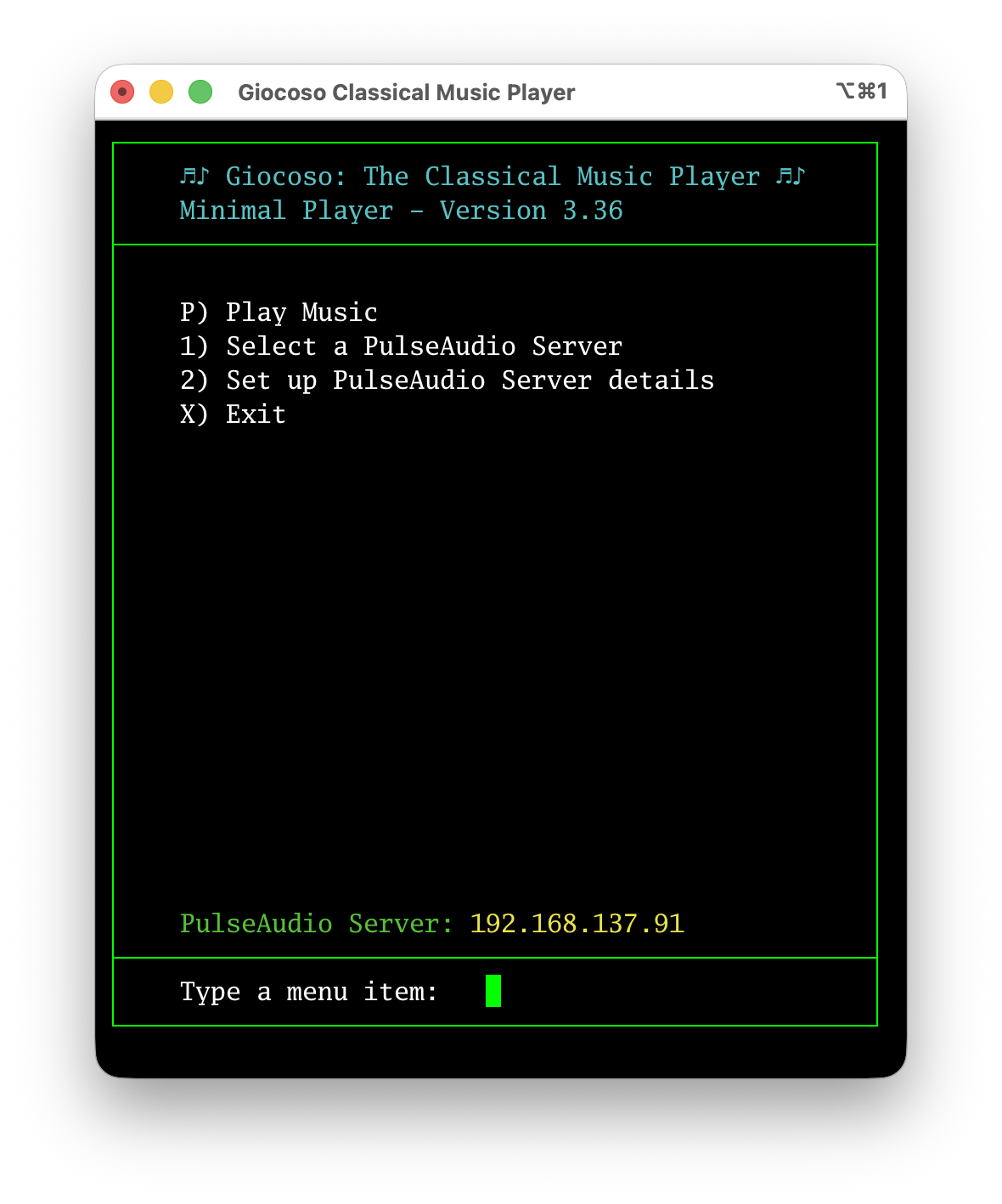
It runs on a computer that has full-blown Giocoso installed on it, but its program display is in portrait mode and limited in width, without graphics, so it runs perfectly on a mobile device that is merely connected to the Giocoso player PC via ssh.
The point this time, however, is to note the Option 1 and Option 2 menu items: these let you set up a number of PulseAudio ‘sinks’ and then select one or other of them as actively in use. Here’s what you see when you take Option 2, for example:
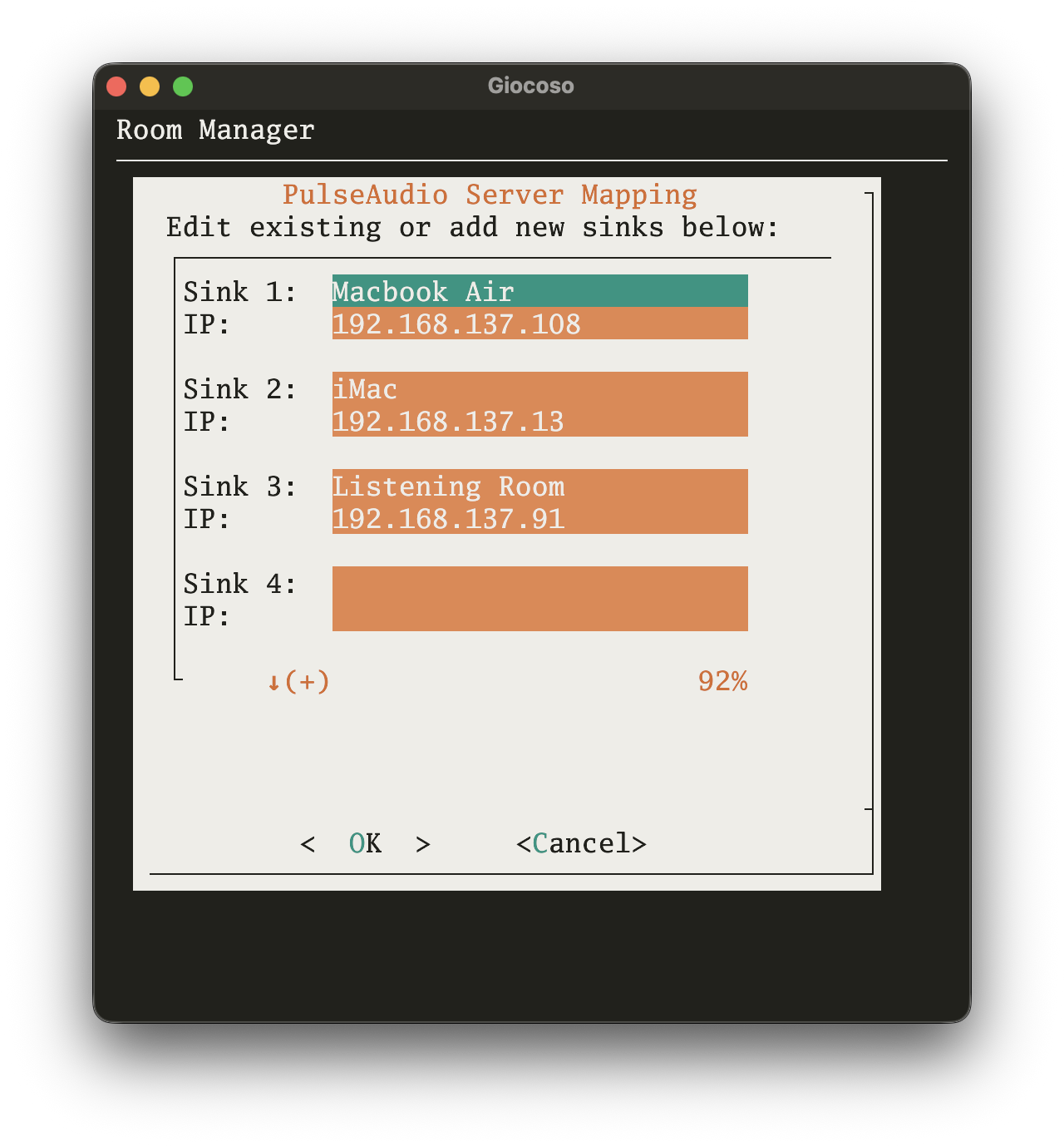
You’re allowed to create up to five ‘sinks’ on this screen: their labels are up to you, but must be less than 14 characters long (they’ll be truncated otherwise). Each label is then paired up to the IP address of the device to which the label applies. Those rather obviously need to be fixed IP addresses (or, at least, addresses with DHCP reservations) so that they don’t change after initial setup: Giocoso on the playing PC needs to be able to find it on the network so that the audio can be sent to the right place.
Once you’ve built a library of possible PulseAudio sinks in this way, you can take the mini-player’s Option 1 to select a particular one of them to send audio to:
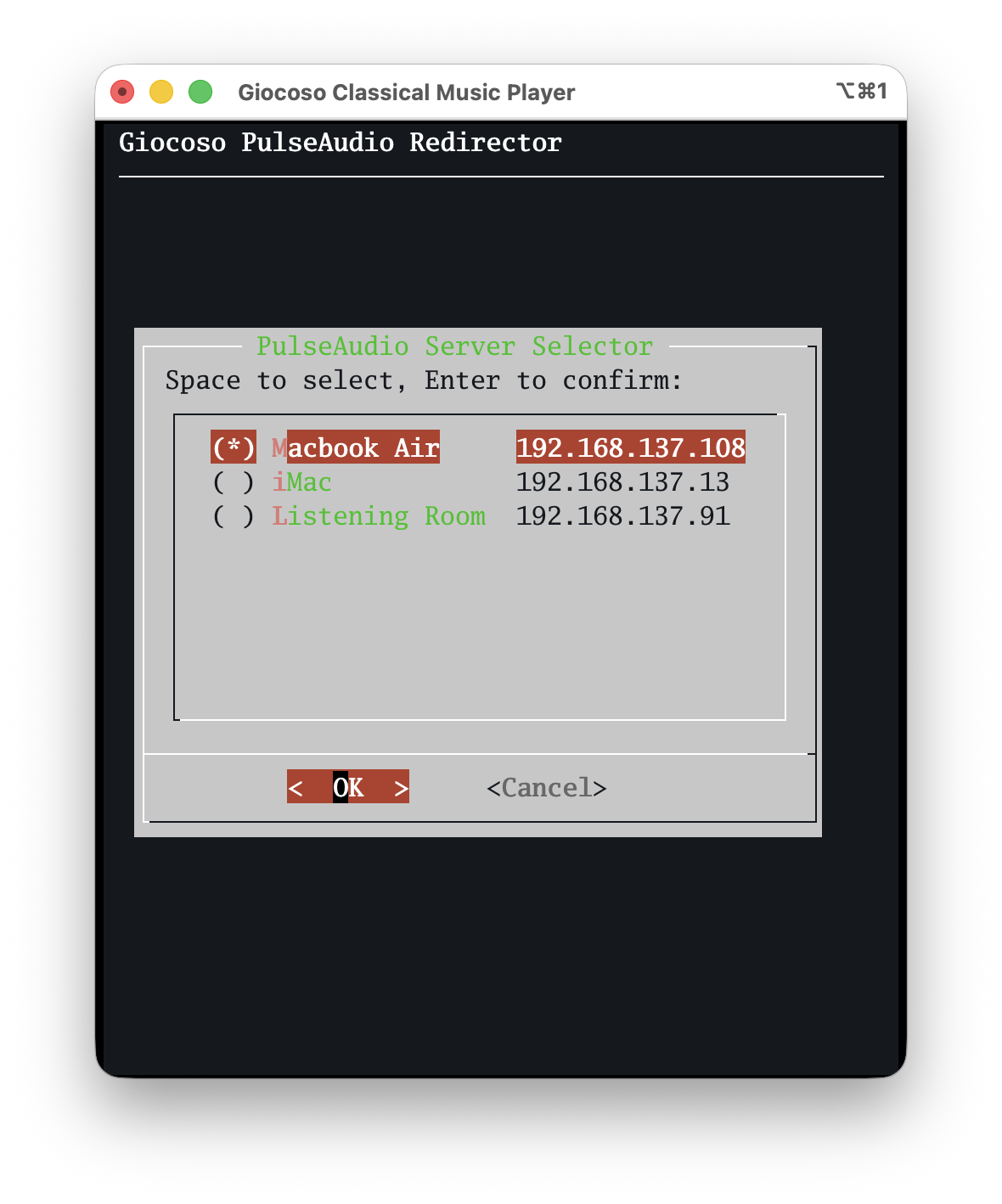
The current audio ‘sink’ is marked with an asterisk; your job is to up and down arrow through the list of available sinks and press the Space Bar when you’re sitting on the item you want to use for the next play: that press of the Space Bar will make the asterisk jump to that item, indicating selection success. Press [Enter] to make the new selection ‘stick’. You’ll be returned to the main mini-player menu where, towards the bottom of the screen, you’ll see confirmation of the currently-selected PulseAudio server: if you then tap the ‘P’ option to play music, it’s this IP address to which music will be directed.
To be clear, for any of this to work, the persistent configuration parameter Force the use of PulseAudio must be set in full-fat Giocoso’s configuration settings:
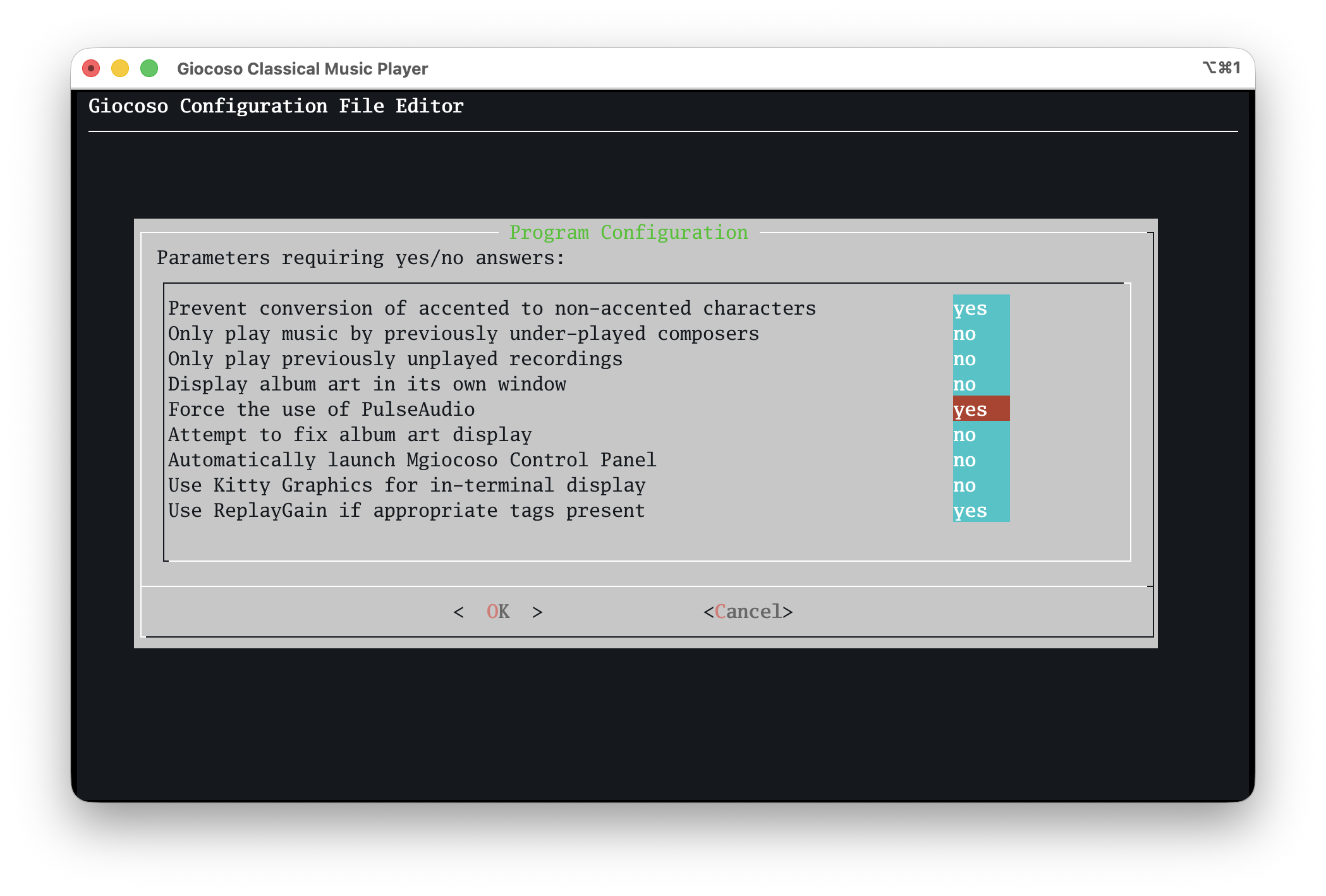
If you haven’t set that parameter to “yes”, then specifying a PulseAudio server to play to simply doesn’t work: audio will ‘sound’ on the PC you’re directly connected to, assuming it has speakers to use! It should also be obvious, I hope, that this can only work if your player PC and the devices it sends audio to are all configured to use PulseAudio (or its cousin, PipeWire, which is essentially the same thing as far as these purposes are concerned). Most Linux distros ship with PulseAudio out-of-the-box and very little, if any, configuration is needed to make them players or sounders. MacOS can also act as a PulseAudio client and server, though things get much more complicated there: I’ll have specific documentation prepared for this topic shortly.
The little secret ingredient I haven’t mentioned until now, too, is that the box doing the Giocoso playing and sending its audio out to ‘sounding devices’ doesn’t have to be a big PC. There’s a reason it was drawn in that earlier diagram with this logo:

That is the official logo of the LXC or Linux Containers project. What is an LXC container? Well, it’s sort-of like a virtual machine, running on a Proxmox hypervisor, but incredibly minimal and lightweight: I have an Arch one configured to use just 2GB of RAM, 8GB of hard disk space and two virtual CPUs. It runs nothing much more than standard Giocoso, configured to use PulseAudio. I ssh into it and, using the mini-player interface, direct it’s audio output to whichever one of my minimalist room setups I need to hear music from at the time.
It is quite complicated to get an LXC container to connect to my music NAS; it is even more complicated to get an LXC container to ‘see’ the physical music playing hardware that the Proxmox host has. Documentation on getting all that working is in preparation, too.
I hasten to add that none of this affects how you use Giocoso if you don’t want it to! All my ‘serious’ music listening happens in my dedicated ‘listening room’: that contains a passively-cooled PC hidden away in a draw, physically connected via optical-out to a full-on DAC and amplifier. I ssh direct into that machine and run full-fat Giocoso on it from my iMac desktop: there’s no PulseAudio involved at all there… and I wouldn’t want it to be!
The new features in version 3.36 of Giocoso simply means that it’s now easier than ever to have less-serious listening follow me about the house, if I want it to: I ssh into the LXC container and direct its output via PulseAudio to the lightweight playing device in whatever room I’m working in at the time. In my garden shed, the playing device is literally a Raspberry Pi 3B playing wirelessly to a small Bluetooth speaker: I’m not expecting great hi-fi fidelity from that setup and sending audio via PulseAudio and Bluetooth therefore doesn’t degrade anything below my already-low expectations! It is enough, however, to have music follow me around the house at will… or, at least, at the touch of some keys on my mobile phone
The Problem of Portability (Part 1)
I was getting ready to release version 3.36 of Giocoso yesterday: it contained a tiny, but significant bug fix, whereby anyone using a comma as a decimal delimiter (as they do in Europe, say), rather than a period/fullstop (as they do in the UK, for example) would have their music playback garbled when the new ReplayGain feature was in use:
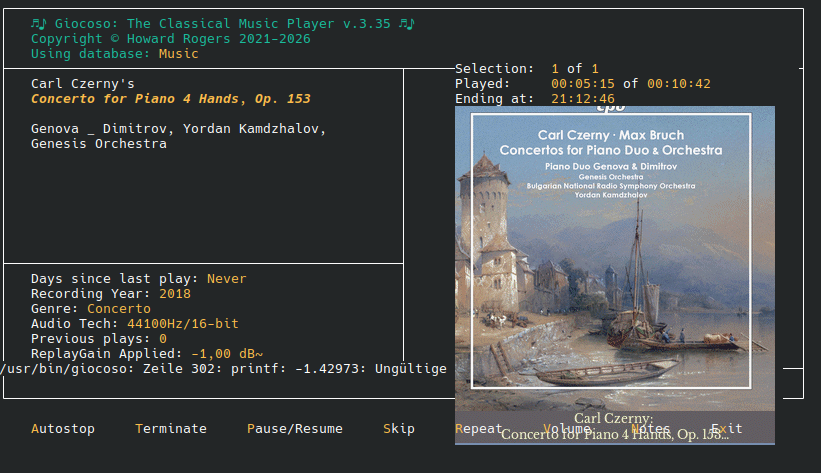
The problem is that ReplayGain is invariably stored, by whatever tool that puts it there, in the form “-1.43”. Confronted with that decimal point, European Giocoso installations declare the ReplayGain value to be 'not a valid number' and do what you see above. A quick fix was thus implemented that forced the use of a decimal point delimiter, whatever a user's general PC's locale would say, and thus guarantee that a ReplayGain would be seen as a valid number, despite the '.' rather than the usual (for them) ','.
Anyway: as I say, that fix is “in” and ready to release… but a bit of mission creep, er… crept in and thus I've deferred the release of version 3.36 until late next week.
The mission creep is to do with a problem I've tried to tackle several times in the past: how do I get music playing on multiple devices around the house, essentially following me as I move about it?
Things started off nice and simply, after all: I have a PC in a drawer connected via optical out to a Douk DAC/Amplifier and a nice pair of speakers in my listening room. Since it's in a drawer, that PC is headless. I therefore tell it what to play by ssh'ing into it from my iMac desktop and tell it to start playing from there. Music comes out of the speakers, sourced from a NAS elsewhere in the house which the drawer PC has mounted. The iMac runs nothing itself but merely tells the 'drawer PC' what to do.
But now I move out into the conservatory. It's no good my 'drawer PC' playing anything now as it will play to the listening room speakers, not anything in the conservatory. I'm also not sitting at my iMac, so I can't really ssh into anything conveniently to initiate play. Previously, I got 'conservatory music' by fitting a little Raspberry Pi in there and attaching it to some speakers. With a small 7 inch monitor, I could log in to that Pi directly and launch Giocoso and start playing music, thanks to the Pi having an NFS connection to my music storage server.
This is not terribly scalable. If I now want to play music in my bedroom, I have an old laptop there, which is again NFS mounted to the music NAS, has Giocoso installed, and can be logged on to directly and I can therefore tell Giocoso to start playing music via the laptop speakers or (more usually at 1AM) via the BlueTooth headphones the laptop can connect to. I mean, it works… but it's three fat PCs, each with their own installation of Giocoso, each requiring direct access to start and stop playback. I at least invented Giocoso Pro so that whatever each of the three PCs did, there would be a single record of who played what, wherever the play took place. Giocoso Pro however makes no difference for the need for three independently-usable, fully-fledged PCs, complete with keyboard, mouse and monitor, in the first place.
The thing is, I have ready access to a device that could SSH into any and all of these PCs: my mobile phone. I could simply have three headless Raspberry Pi 3Bs in each room, each connected to the music NAS, each with Giocoso installed. Whip out my phone, ssh into whichever one I want to start playing music and… and then? Therein lies the perennial problem. Let me give you a clue as to what happens when I try that and launch Giocoso:
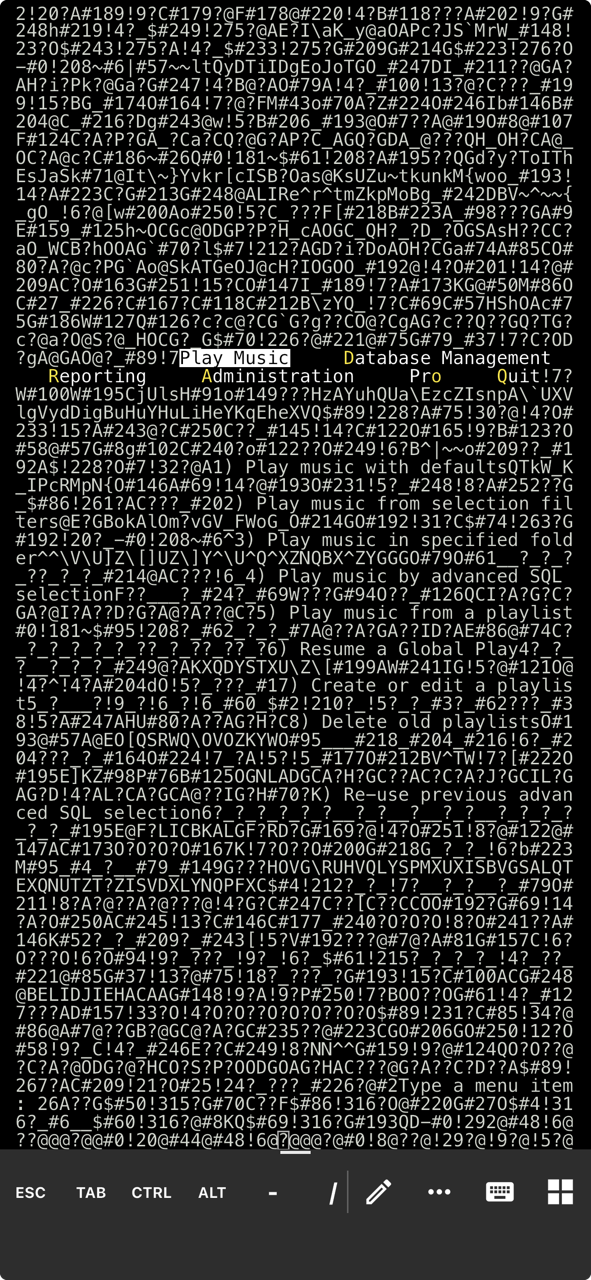
It reminds me of the Rosetta stone, only somewhat less translatable! You might just be able to pick out the standard Giocoso main menu: Play Music, Database Management and so on. But the rest of the display is just junk, for the simple reason that there's no Android or iPhone terminal emulator I know of that knows how to display sixel graphics properly. What you';re seeing here, therefore, is how a non-sixel-enabled terminal handles displaying the Giocoso program logo. The same thing happens if you start playing a recording and Giocoso tries to display its album art in-terminal.
Apart from the graphical glitch, the other problem with Giocoso on a phone is that phones are mostly portrait in orientation, whilst Giocoso is definitely a landscape kind of app: wide than it is tall! Hence, on this screenshot, you can see the one-line top bar menu has wrapped onto two lines. Phone screens just aren't wide enough!
It is, of course, for this reason that I invented mgiocoso ('m' for 'mobile'!): it was designed to be a 'portrait' app and it didn't display any graphics, so the terminal wouldn't fill up with nonsense:
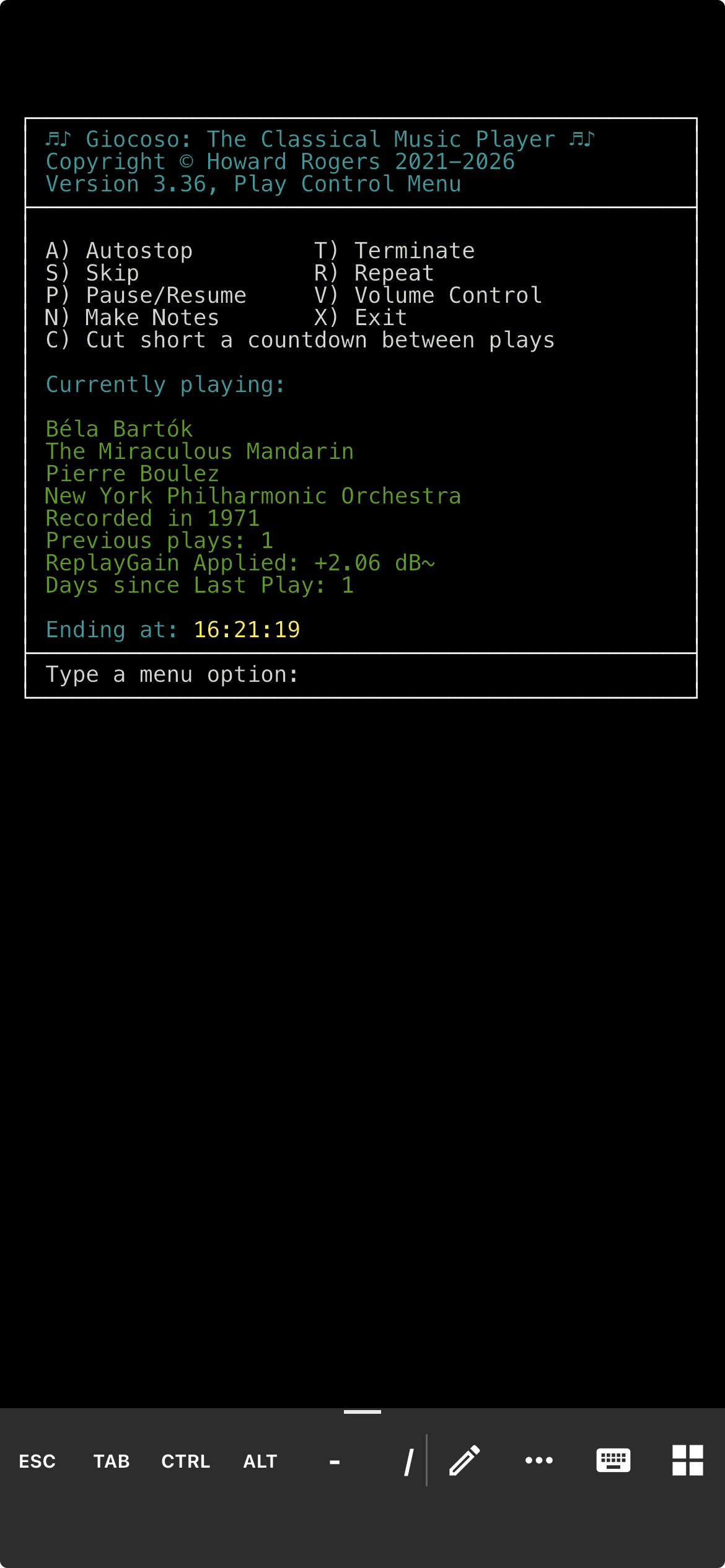
Much better! Intelligible output, displaying what the main Giocoso running on the machine I've ssh'd into is already playing, and giving you the ability to pause, skip, terminate or repeat that play, too, all contained within the device you probably already carry with you everywhere. What's not to like?!
Well… you'll notice that you can't initiate play with mgiocoso. You can control an already-playing Giocoso session, but you can't start playback from your mobile device. In my three-room scenario earlier, therefore, I'm doomed to require a screen on each room's PC, or to access all of them from one PC with a screen, via ssh.
So the mission creep for Giocoso version 3.36 is this:
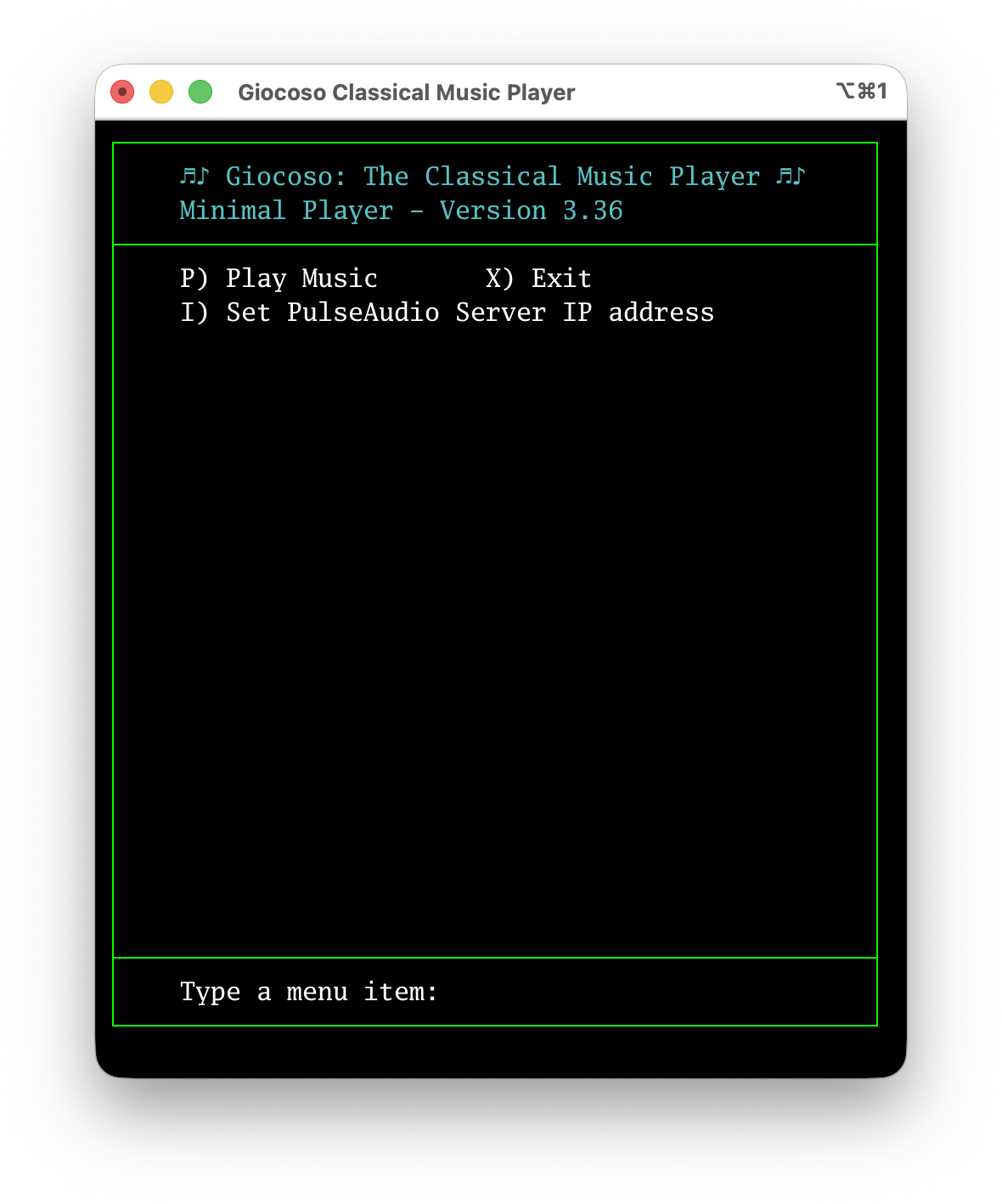
It's in portrait mode, so fits a mobile display. It doesn't have any graphics, so doesn't scramble a mobile display with hieroglyhics. And, drum roll please, it has a 'Play Music' menu option. This is the new Giocoso “mini-player”, which will be part of the next 3.36 release. It can run on a mobile phone, displays OK and will let you initiate playback. So, now I could have three headless PCs, each with access to the music NAS, each with Giocoso installed; I can ssh into each of them as needed, invoke giocoso-player.sh and then start music playing on whatever PC or Pi I've ssh'd into:
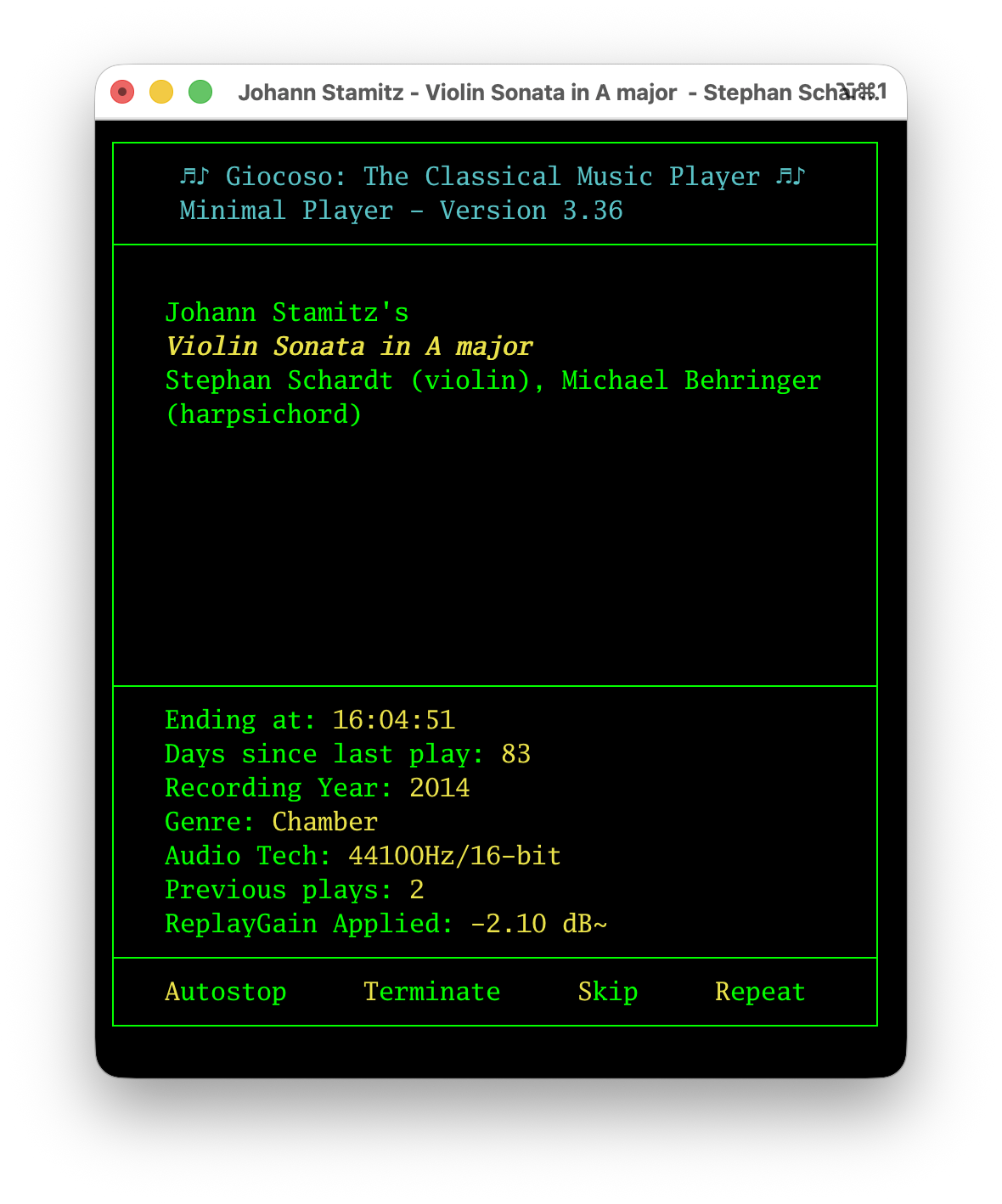
I don't see any album art, true enough: but I wouldn't want to on my mobile phone. I do at least get comprehensive data about what's playing and when it's due to end -and I still can control the playback to some extent, with options to Autostop, Terminate, Skip and Repeat available as they would be in a 'normal', full-fat Giocoso session.
The only slight fly in the ointment is that each of my PCs still has to be beefy enough to have an NFS mount capability, to have all the Giocoso dependency packages installed and to be able to run Giocoso (and ffmpeg) without glitching. The new mini-player mode gives me control via my mobile phone device, but it doesn't in itself alleviate the need for the PC its controlling to be reasonably powerful enough to play FLACs by itself.
Fixing that requirement is another bit of mission creep that has delayed the next Giocoso release a little… and I'll discuss it in some detail in Part 2 of this post, in a couple of days: for now, this post has gone on quite long enough!
Poor Peter Grimes
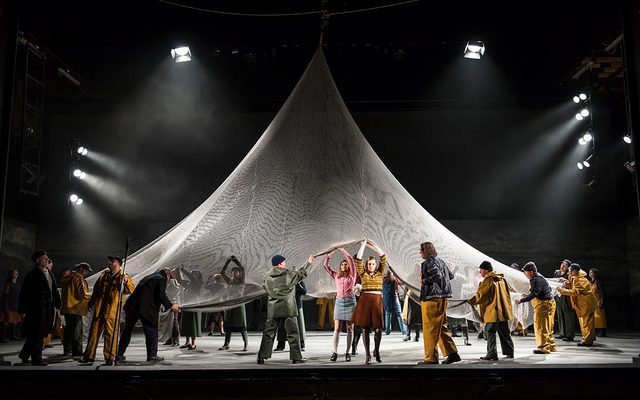 Last Friday, I had a great night out at Nottingham's Theatre Royal to see a performance by Opera North of Benjamin Britten's Peter Grimes. Expectations were high: I don't think I've ever seen a whole performance of this opera live, though I definitely remember walking out of Jon Vickers' mangling of the role at a performance in Covent Garden sometime in the 1980s! Let me say at the outset that I enjoyed the evening, on the whole. The orchestra played wonderfully and the chorus sang vividly: no complaints there, at all. They were thrilling to hear. Balstrode and Swallow were sung magnificently; Ellen Orford was sung rather well; Bob Boles' was also a strong performance. Unfortunately, Auntie was sung by someone who simply couldn't get down to the low alto notes and therefore was practically inaudible throughout. Peter Grimes was also not sung brilliantly: his Act 1 was fine. His mad scene was histrionic without emotion. And throughout, his top notes just weren't really there. When your eponymous hero can't quite sing the best parts of the role, you have a bit of a problem, I feel!
All that said, the music wasn't the main problem of the evening. That belongs with the director. The opera is supposed to open with a “bang!”: “Peter Grimes, Peter Grimes, we are here to investigate the cause of death of your apprentice, William Spode”. Straight in, no messing, scene set, backstory explained, all done within 20 seconds of the conductor raising his baton. What we got in Nottingham was some sort of “pantomime”, in which the curtain rose, silence descended and a torso wrapped in fishing nets was 'discovered' by children scampering across the stage. Presumably, this was the body of William Spode: though I have to say it was an exceptionally well-developed torso of a thirty year-old, not exactly your weedy boy apprentice that William Spode is supposed to have been. Regardless of the incongruent torso's physique, however, the point is: the opera doesn't require a stupid pantomime to contextualise the rest of the action. That's done for you in the first 18 words of the opera, blasted into the auditorium within seconds of the music starting. The pantomime was just the director trying, one presumes, to spoon-feed a context to an opera-illiterate audience. I didn't appreciate it, shall we say?
Worse, the ending: Peter Grimes is supposed to sail off until he loses sight of land, then sink his boat. The Borough's population is then meant to get on with their lives, essentially as if nothing much had happened. Curtain down, cue the applause. What we got, instead, was the music ending but the cast staying on stage swaying ridiculously from side to side with a giant net (see the thumbnail above), which made 'swooshing' sounds as it moved. This lasted an excruciating few minutes before the curtain finally descended and applause ensued. The swooshing sound was, of course, intended to sound like the sea (as some excited woman on the way out of the venue announced she had discerned). The trouble is that the sea is not meant to be a protagonist in the opera, with the last word. It's a character, of course, with varying moods, from thundering storm to twinkling sunlight on glittering waves. But it isn't the villain of the piece: that role is reserved to the people of the Borough whose conformity and resentfulness of difference and vision is what dooms Grimes. Theirs is supposed to be the last word: “Coastguard reports, there's a boat sinking out at sea… I see nothing… Just one of these rumours… move on”. If you detract from that conclusion, you lose the whole point of the opera: of the visionary dreamer against a constrained, conventional society; of the outsider against the indifferent crowd. Opera North comprehensively missed the point: we don't need nets sounding like the sea to conclude this opera. We just need the Borough to shrug its collective shoulders and get on with life, dismissive of the visionary it has just destroyed. The ending of the performance was as gormless as its opening, basically.
Another annoyance, too: at the end of the opera, Balstrode gives advice to Grimes to take his boat out until he loses sight of land, then sink it (and himself) to oblivion. It is meant to be an act of kindness, even of love: to spare Peter from the wrath of the Borough and relieve him of his pain and torment. It is meant to be said kindly and gently. Our Balstrode, however, decided to turn tail, lose patience, metaphorically roll his eyes and clearly couldn't wait to be rid of this Grimes fellow. Again, a total misreading of the opera, its meaning and intent.
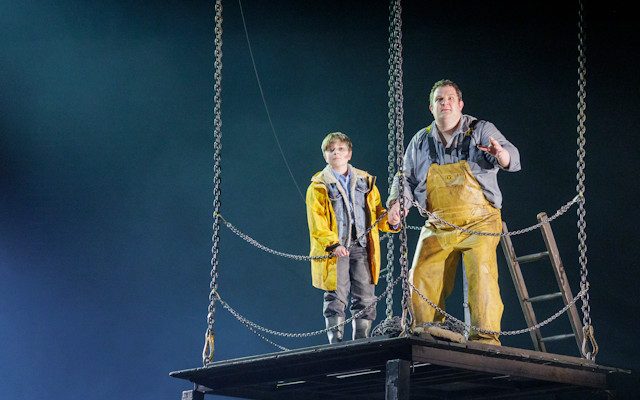 I didn't like the staging much, either. When the libretto mentions “Grimes' hut”, you kind of expect “a hut”, not something that looked like a curtailed oil rig in the North Sea (see picture at the right). I'm prepared to suspend my disbelief quite willingly… but no man could live comfortably on a 12 foot square of timber in the upper atmosphere! Watching the new apprentice get hitched to a wire before falling off said platform was just excruciating. He's meant to walk out of a hut, leave the door open… and then we hear him scream as he falls down the cliff off-stage. There's neither reason nor point in making the poor lad do a leap in the centre of the stage, even with a harness laboriously attached. It just looked stupid.
I won't mention (OK, I will) the fact that there are really two big emotional fulcrums in the piece: the clash between Grimes and Ellen outside the Church on Sunday, and Grimes' mad scene. Unfortunately, the Nottingham audience wasn't playing ball for either key moment. During the outside-Church confrontation, a fellow in the rows behind me decided he was going to have some sort of epileptic fit. Which is absolutely fine: these things happen and my sympathies were definitely with him. Unfortunately, his fit took the form of rather loud and continuous moaning and instead of getting him out of the auditorium with all due haste and minimum fuss, this went on throughout the piece. Key moment #1 missed entirely. The lady in the row behind me then decided she would have a coughing fit throughout the Grimes mad scene. Again, I wouldn't have minded so much, except that she apologised to everyone around her in a rather loud stage whisper. Which was, perhaps, considerate… except that she then chose to round things off by getting out the throat sweets and unwrapping them throughout what remained of the mad scene. Key moment #2 thereby ruined.
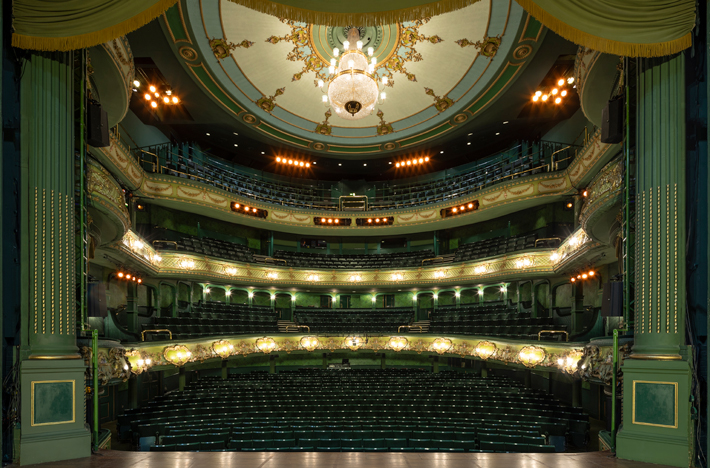 I lay those misadventures at the feet of the idiotic public, not those of Opera North, of course. But the ham-fisted production of this opera is all their own doing and the less-than-stellar performances of Grimes and Aunty are equally of their own creation. Full marks to the chorus and orchestra, however… and extra marks to the Theatre Royal: it's a proper 'traditional' opera house, in green and gold, in the raked-box style of La Scala and with a most impressive chandelier! I had no idea Nottingham was blessed with such a beauty (and I lived there for six years!).
Overall, 7/10 for the orchestra, chorus and powerful Act 1. Points off for completely unnecessary and misguided prologue and epilogue 'pantomimes', the weak performances from two key singers and the (expected) dreadful behaviour of assorted members of the public. There are reasons I don't go to live performances of opera very often: this outing reminded me of what they are.