This is an old revision of the document!
The Persistent Configuration File
1.0 Introduction
Niente's behaviour is controlled by the various settings found in its persistent configuration file, which is a text file called $HOME/.local/share/niente4/txt/niente.conf. Since it is merely a text file, it can be edited directly in any text editor you happen to favour. However, it consists of a set of keyword=value parameters whose meaning and legal or default values may not be obvious to you, so whenever you want to alter its contents, it's much better and safer to use Niente's own specific menu option to do so: the Administration menu, Option 1 : Edit Configuration File. Taking that option will bring up a screen like this one:
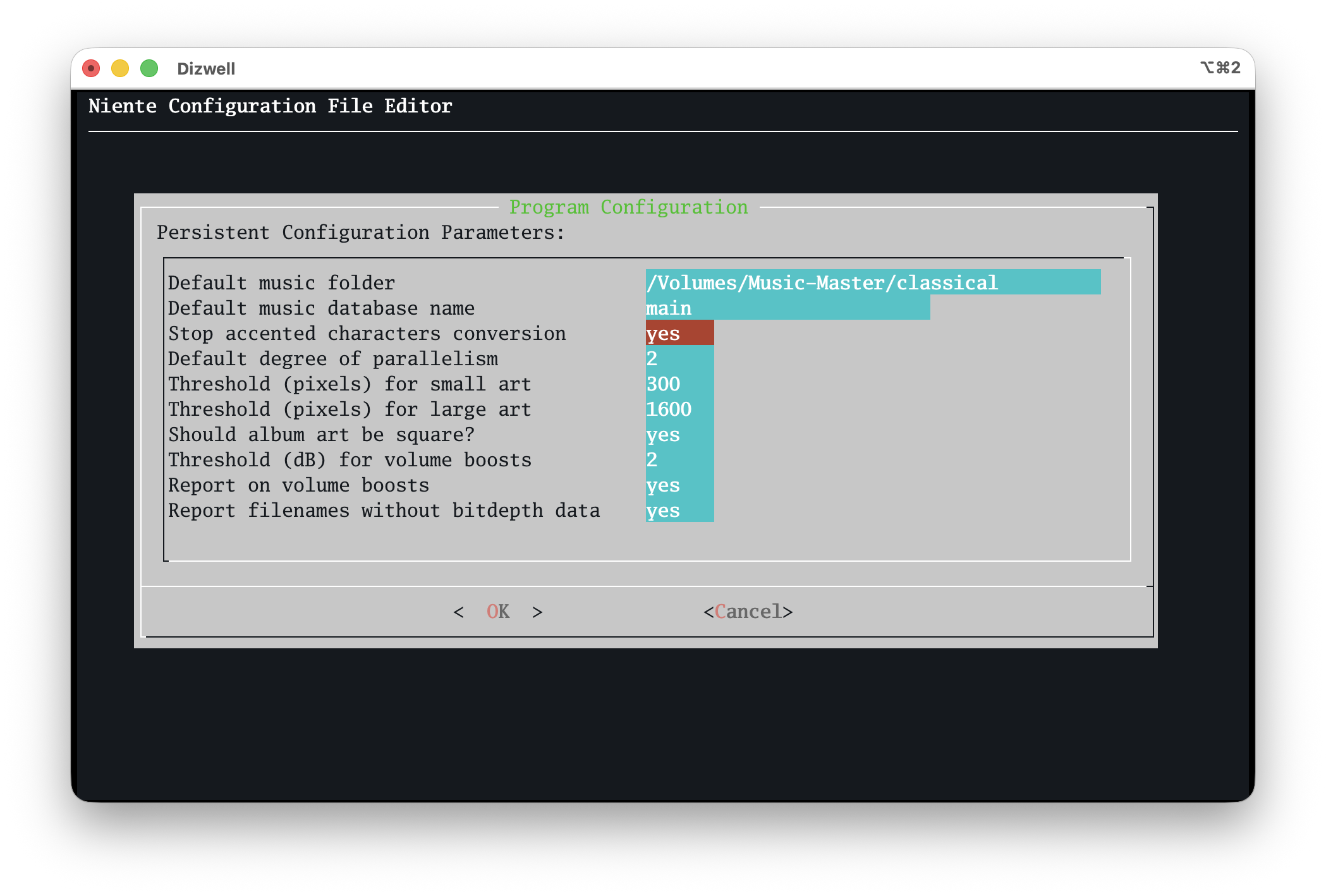
…in which textual prompts are paired with data entry fields. The text prompts use natural language wherever possible and the values you assign to them are also in natural language (for example, the screen uses yes or no answers, rather than binary 1 or 0 values). All possible configuration parameters are displayed and are editable on this one screen. The specific consequence of setting or unsetting any of these parameters should be determined by reading the relevant section of the User Manual: for the meaning of 'Threshold (pixels) for small art', for example, you'd want to consult this page of the manual and, specifically, Section 4.1 since the parameter governs when Niente thinks a piece of embedded album art is too small for its own good!
Generally, the default values for most parameters should be acceptable and safe out-of-the-box (though the 'Default music folder' is liable to need customisation before you first run Niente). If you attempt to set a parameter to an illegal value (for example, setting the 'default default degree of paralellism' to the literal text 'as big as you can make it'), the default value (of 2) will be applied instead: degrees of parallelism require numeric values, not textual essays!
2.0 Parameters, Default Values and Effects
The following table lists all persistent configuration parameter names in both their 'plain English' forms and the form in which they are stored within the configuration file. It shows the default value where one applies and briefly describes the effect the parameter has on the way Semplice works.
| Parameter Friendly Name | Parameter | Default Value | Legal Values | Program Effect |
|---|---|---|---|---|
| Default music folder | MUSICDIR | blank or null | Any valid full path to a folder that contains somewhere within itself a set of FLACs you wish to check for integrity | The default path that is used when scanning for FLACs to add to the database or to read during integrity checks |
| Default music database name | DBNAME | blank or null | Any textual value, preferably without spaces | The default database to open when launching Niente |
| Stop accented characters conversion | UTFCHARS | no | yes or no | If you type é or ü (or other accented characters), sometimes those may be converted to plain, unaccented equivalents such as e or u. Set this to 'yes' to stop that happening. It shouldn't happen anyway in most properly-configured Linux environments. |
| Default degree of parallelism | PARALLELISM | 2 | Any numeric value, less than or equal to the number of logical CPUs on your system | High parallelism speeds up some file scanning operations, but increases CPU load on your PC. |
| Threshold (pixels) for small art | SMALLART | 300 | Any numeric value | Sets the minimum size embedded album artwork can be before Niente reports it as being too small |
| Threshold (pixels) for large art | LARGEART | 1600 | Any numeric value | Sets the maximum size embedded album artwork can be before Niente reports it as being too big |
| Should album art be square | SQUAREART | yes | yes or no | If a piece of embedded album art is detected to has a different height and width, is that to be considered a reportable problem or not? |
| Theshold (dB) for volume boosts | VOLUMETHRESHOLD | 2 (i.e., 2dB) | Any positive numeric value | Sets the minimum possible volume boost that should count as indicating a 'problem' on the Potential Volume Boosts report |
| Report on volume boosts | MAXV | yes | yes or no | Include or exclude the count of possible volume boosts from the Quick Aggregate Statistics report |
| Report filenames without bitdepth data | NAMEBITS | yes | yes or no | Include or exclude the count of filenames that don't appear to contain bitdepth data from the Quick Aggregate Statistics report |
Most of the parameters are, I think, self-explanatory and generally only ever change what is considered a 'problem' when running reports: what is considered a too-quiet recording, for example; what is considered too-large a piece of embedded album art and so on.
There are a couple of constraints on what is allowed to be entered for some of these parameters: if you set the small art threshold higher than the large art one, for example, then Niente will silently reverse the two numbers so that they make logical sense. It would not be sensible to regard a piece of artwork as too small if it's more than 3000 pixels big, but too large if it's more than 500 pixels, for example! But “too small at 500, too big at 3000” makes much more sense.
Similarly, Niente won't let you enter a pixel size for the font used to generate reports that is smaller than 6 -because then the reports would be illegible. You can't set the font size to 48 (pt) either, because then the report would be so large it would also be illegible! So Niente will check this parameter value for you and reset to the default value of '12pt' if illegal values are found.
Probably the two most crucial parameters are the default database name and music folder: these determine what database Niente opens by default as it is launched, and where it will go to scan for new music files. If you leave these two values blank, you'll be prompted to supply suitable values every time you launch Niente, which becomes quite tedious really fast! What you type here, however, has to exist for the parameters to be meaningful: if you say your default database is called “NienteDB” when you've really created a database called “nientedb”, then the mismatch in the use of capital letters in the name will mean that you've told Niente to use a database by default which doesn't actually exist: that will trigger the incessant launch-time prompt to select a database properly. Similarly, if you specific a default music folder which doesn't physically exist on disk (or to which you have read permissions), then Niente will automatically wipe out your supplied value and leave the parameter set to blank: that again will trigger the launch-time prompt for a workable music folder.
| Back to Software Home | Back to Niente Documentation Home |